Tip: MCP File Upload
Quick tip on uploading files from an agent while MCP protocol doesn't support it natively by using pre-signed URLs.
If you have been working with Claude and building MCP servers, you might have found use cases in which you need to upload files from an agent to your server. Unfortunately, the MCP doesn’t support file uploads natively yet, there is a charter dedicated to solve this but in the mean time you can achieve it by using a simple workaround: pre-signed URLs.
Whenever you upload a file to Claude it doesn’t stay in the conversation context, instead Claude uploads it to a sandbox, which acts as a temporary storage and from which Claude can execute commands and code. We can leverage this by creating a simple tool in our MCP that returns a pre-signed upload URL: a short lived URL that allows to upload a file to a storage bucket without requiring authentication.
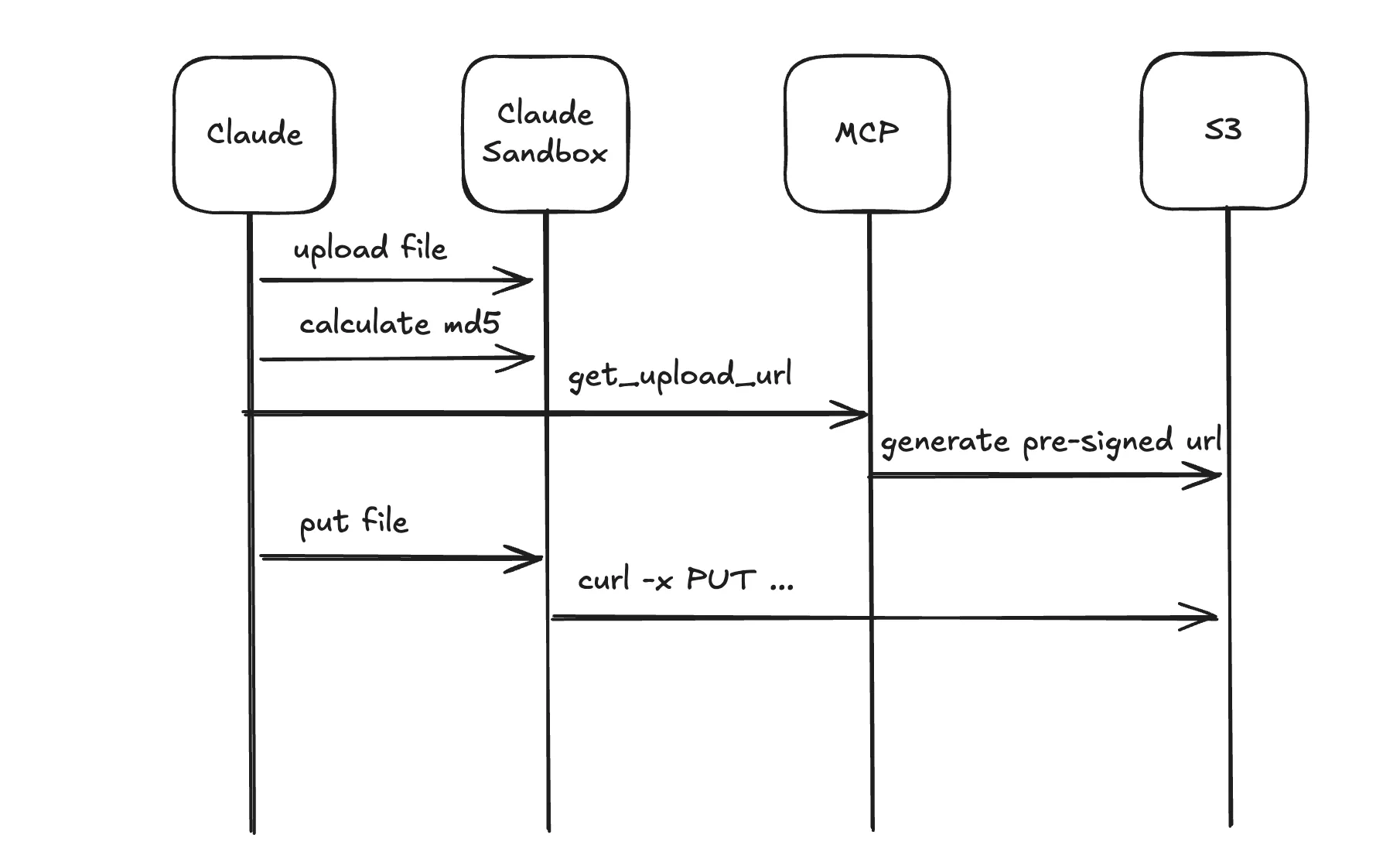
The following code shows a simple implementation of a tool that returns a pre-signed S3 upload URL.
import { S3Client, PutObjectCommand } from "@aws-sdk/client-s3";
import { getSignedUrl } from "@aws-sdk/s3-request-presigner";
import { McpServer } from "@modelcontextprotocol/sdk/server/mcp.js";
import { z } from "zod";

export function createS3UploadTool(server: McpServer) {
  const s3 = new S3Client({
    region: "us-east-1",
  });

  server.tool(
    "get_upload_url",
    "Create a one-minute S3 presigned URL for uploading a file. The upload must include the returned Content-MD5 header.",
    {
      key: z.string().describe("S3 object key"),
      md5: z.string().describe("Base64-encoded MD5 digest of the file bytes"),
    },
    async ({ key, md5 }) => {
      const command = new PutObjectCommand({
        Bucket: "my-bucket",
        Key: key,
        ContentMD5: md5,
      });

      const url = await getSignedUrl(s3, command, {
        expiresIn: 60,
      });

      return {
        content: [
          {
            type: "text",
            text: JSON.stringify({
              url,
              method: "PUT",
              expiresIn: 60,
              key,
              headers: {
                "Content-MD5": md5,
              },
            }),
          },
        ],
      };
    },
  );
}
After calling this tool, claude will use curl command to upload the file to the returned URL.
Keep in mind Claude restricts outbound network access from its sandbox, you will need your org to include your-bucket.s3.amazonaws.com to the list of allowed hosts.
You can of course use other storage providers or put additional pieces in the middle, but this is the core idea.